PDForsell

Business-use, produced PDF editing software
Install and use it right away, a one-time purchase.
PDForsell is a downloadable PDF editing software for Windows.
You can use it for a long time with peace of mind, with no subscription required and no extra charges.

Desktop Application
Developed as a Windows desktop application.

One-time purchase・No additional charge
One-time purchase, reusable. No subscription needed.

Email support
We will also provide support via email after implementation.

Offline use
No internet connection required for use, and security is also reliable.
■Used in the following operations
It is used in everyday situations where PDFs are handled, such as by administrative scriveners, tax accountants, real estate professionals, and in administrative work at general companies.
It is ideal for professional use, emphasizing "light, easy, and reliable editing."
Reasons for being chosen
Light and responsive operation
Runs smoothly on Windows native apps
Intuitive operation
Simple UI that can be operated without instructions.
You can edit pages while viewing a PDF file.
Installable stability
Unlike browser-based applications, it offers stable operation.
■ PDForsell Features
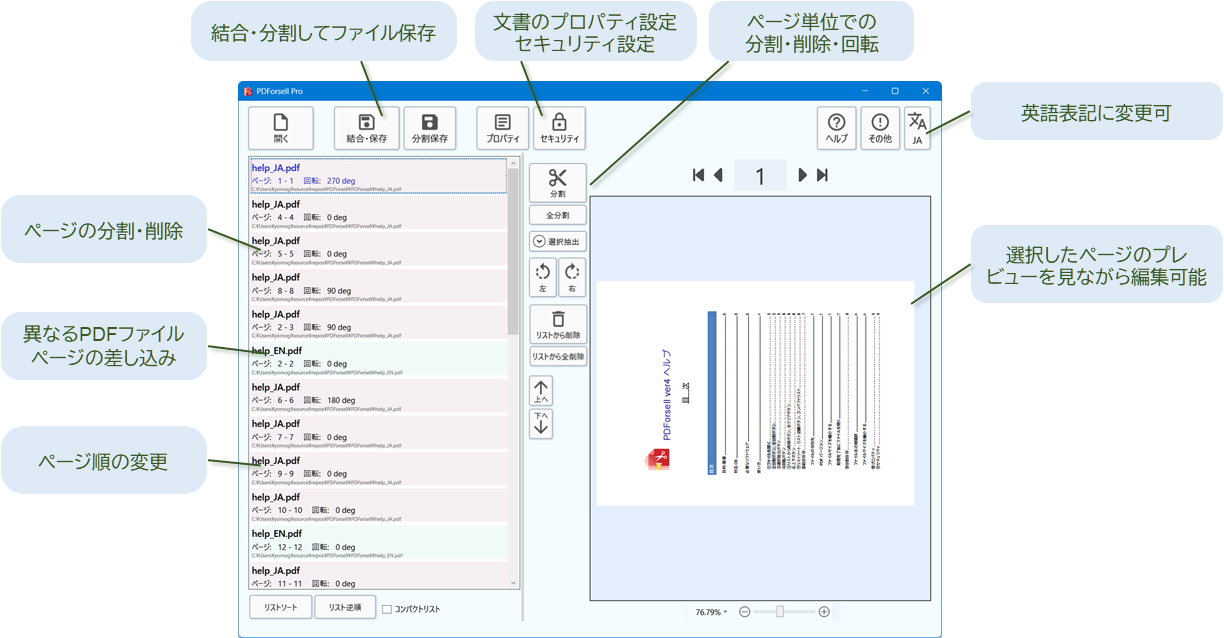
Supports corporate use
Provide a license management tool
We offer a management tool that can centrally manage multiple PCs.
Please contact us after your purchase.
Volume discounts available
Multiple unit discount available
We also support adoption by companies and organizations.
■Fees

・No functional restrictions
・Personal hobby or other non-business use
・Trial use before purchase
Free
・"Not for commercial use" displayed in the title bar
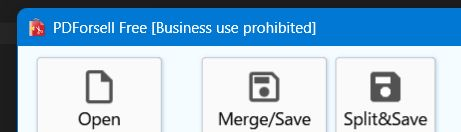
・PDF file has an embedded "Not for commercial use" notice


・No functional restrictions
・For business use, please purchase a PRO license.
1 license
$20
Volume discount
10 licenses
100 licenses
1000 licenses
10%OFF!
20%OFF!
30%OFF!
■ Introduction Flow
Download
Free download
You can continue to use it for free for non-business use.
2. Installation
Install and try
Check functionality
3. License Purchase and Registration
After purchasing the license, start and activate the license.
4. Start using immediately
No complicated setup required.
■ Frequently Asked Questions
Q. Are there any feature differences between FREE and PRO?
There are no functional differences.
What is the scope of business use?
A. Business use is defined as anything directly or indirectly related to profit-generating activities.
You can continue to use it for free for non-profit activities for schools and personal use.
Q. I plan to use this for business purposes, but I'd like to try it out first. Do I need to purchase a license?
In the case of a trial, no license purchase is necessary. If you generate files related to business operations, you will need to purchase a license.
A. Where do I perform license activation?
A. Your license key is included in the email that will be sent after your purchase. Launch PDForsell, go to About -> License, enter your license key, and press the "Authenticate" button.
Can the same user use it on multiple PCs?
A. The license is per PC.
If you are using multiple units, you will need to purchase a license for each one.
Can the same user use it on multiple PCs?
A. The license is per PC. If you plan to use it on multiple computers, you will need to purchase a separate license for each.
A. Do you accept bank transfers?
A. We support it. Please select bank transfer as your payment method on the PRO license purchase page.
Q. Can I purchase the license once and use it forever?
A. The perpetual license covers minor version upgrades (no additional purchase is necessary as long as it's within ver4.*). The licenses for ver2 and ver3, which have already reached end-of-support, are not compatible.
The PC I was using has gotten old, so I want to transfer the license to a new PC.
A. If you wish to transfer your license due to PC replacement or other reasons, go to the authentication screen in "Other" > "License", enter the target license number, and press the "Deauthenticate" button. This will clear the license information on the existing PC. (Deauthentication is possible on any PC for a full deauthentication.) Then, on the new PC, enter the license number again and click "Authenticate" to register the license on the new PC.
What is a management tool for corporations?
A. A management tool for corporations is a tool that allows for the centralized management of licenses. We can also prepare batch files for automatic license registration for internal users. If you are interested,InquiriesPlease contact us.
Do you need an internet connection?
A. An internet connection is required for license authentication. After authentication, you can use the software offline.
A. It transmits personal information to the Yomogi Software server?
A. We do not collect personal information. When activating the license, information that can identify your PC is sent to our server after undergoing irreversible encryption and is then linked to your license. Because it is encrypted, Yomogi Software cannot know that PC's individual information.
Q. Is the payment security safe?
A. Yomogi Software's payment is primarilyKOMOJUWe provide this service through a payment gateway. We also support various code payments and convenience store payments. You can use it with peace of mind.
Q. When I launch the installer, a "Windows protected your PC" screen appears.
A. If the Windows PC protection screen appears, click here